HTML to PDF in Python: an invoice from a Jinja template
Convert HTML to PDF in Python. Render an invoice from a Jinja template, serve it from FastAPI, and see how xhtml2pdf, WeasyPrint, pdfkit and Playwright compare.

This tutorial turns an HTML invoice template and a JSON file into a two-page PDF in Python. The invoice has the parts that usually break when HTML becomes a PDF: a Flexbox header with an SVG logo, a web font, a line-item table that runs onto a second page and repeats its header row, totals that stay together, and "Page 1 of 2" in the footer.
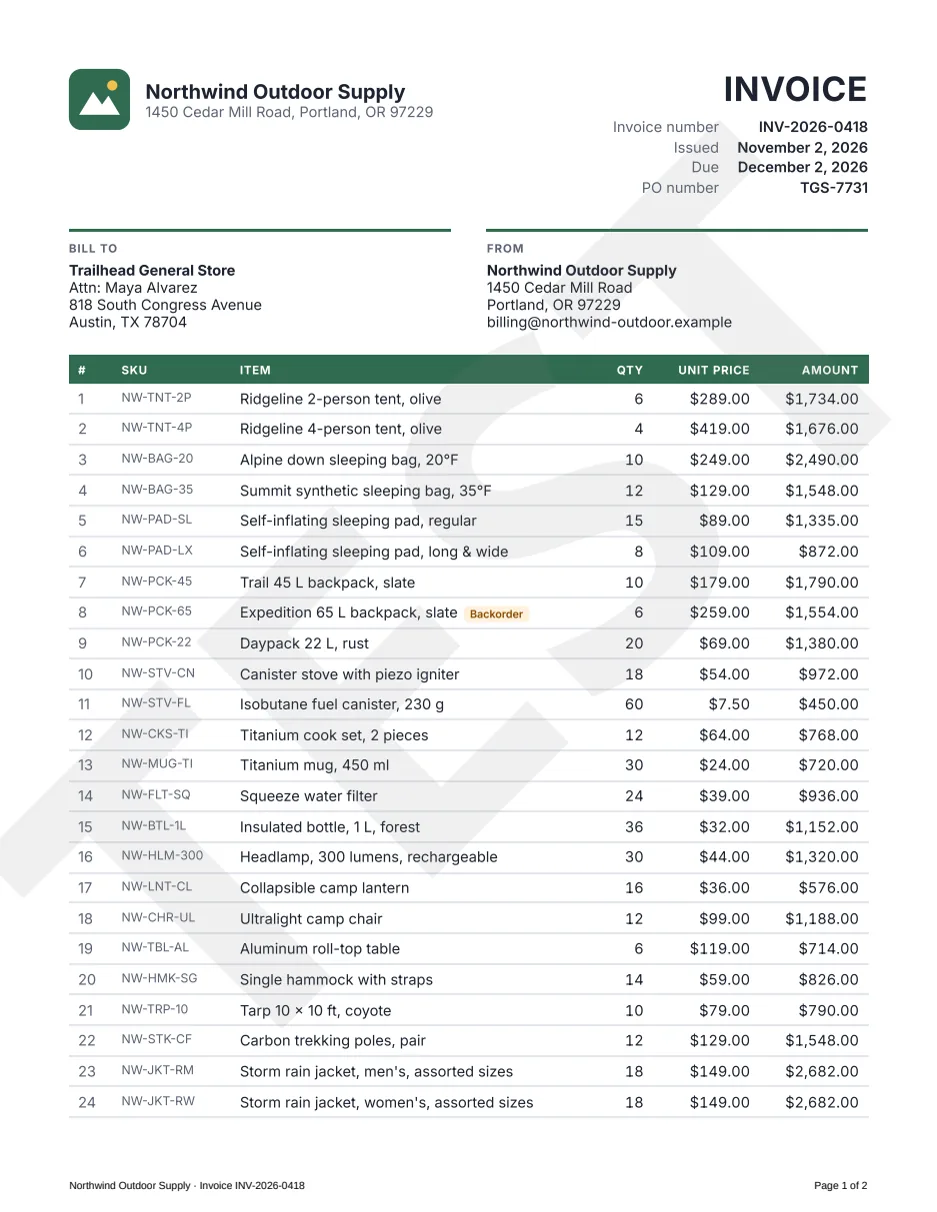
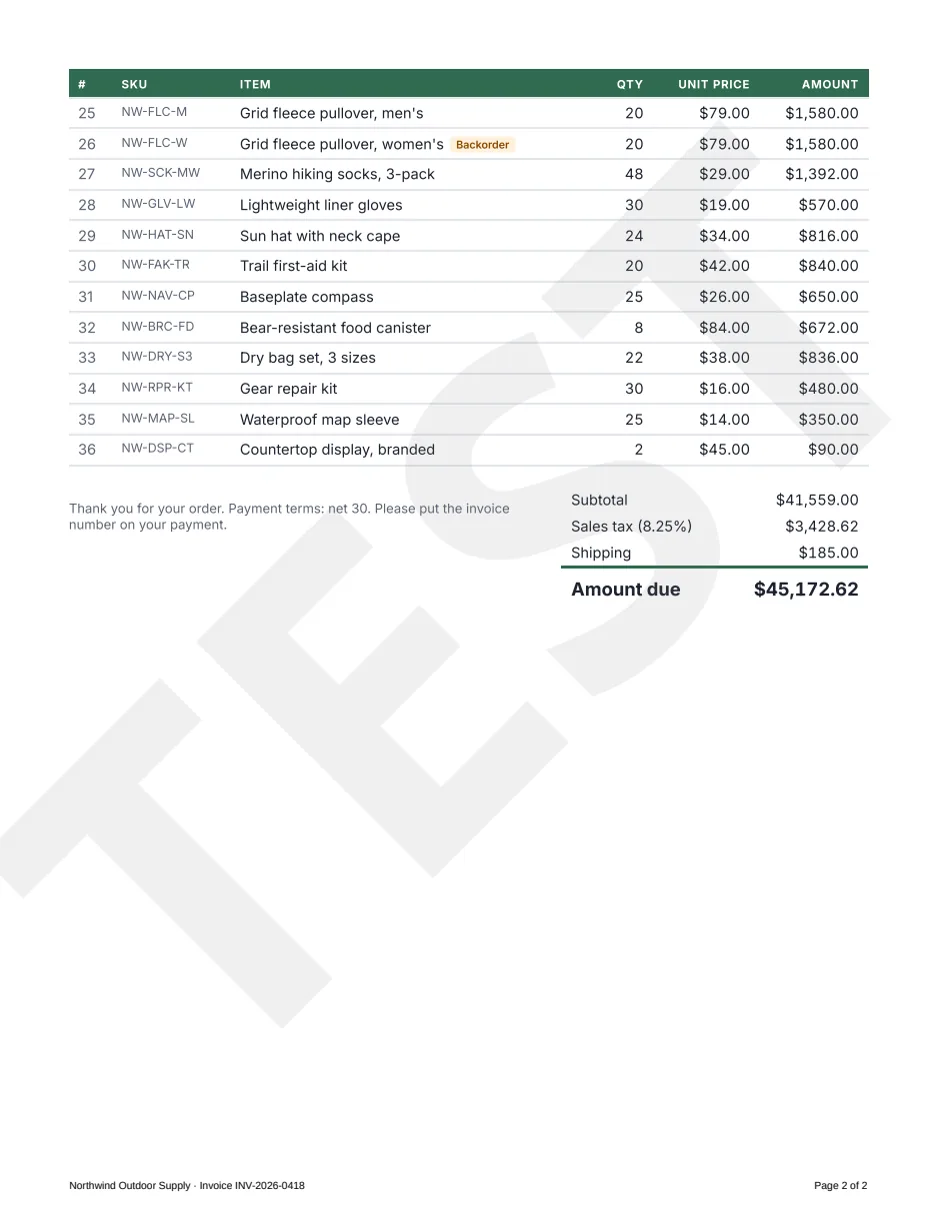
Before the code, a test: the same invoice through the four libraries Python developers usually reach for, so you can see which one fits your project. Then the steps:
- a Jinja template for the invoice,
- rendering it with the Python SDK,
- paper size, margins and page numbers,
- the same request with plain
requests, and with your own Jinja2 setup, - a FastAPI endpoint that returns the PDF,
- what to change for production.
Prefer to watch? This 11-minute video walks through the same steps: the library comparison, the template, the Python SDK, plain requests, your own Jinja2 setup, the FastAPI route and the errors to plan for.
You need Python 3.9 or newer and an API key from the dashboard at https://app.dynamicdocumentapi.com (free plan, no card needed). A test key (dda_test_…) is free and adds a TEST watermark. The complete example is on GitHub: the template, 36 sample line items, every script from this page and the comparison.
Which way to convert HTML to PDF in Python?
We rendered the same invoice with xhtml2pdf, WeasyPrint, pdfkit and Playwright, each with page numbers added the way its documentation describes. Every library got the same finished HTML, filled in with Jinja2. The test runs in GitHub Actions on Debian 12 with Python 3.12; the scripts and all results are in the compare folder of the repository.
Page 1 of each result, in this order: xhtml2pdf, WeasyPrint, pdfkit with wkhtmltopdf, Playwright.
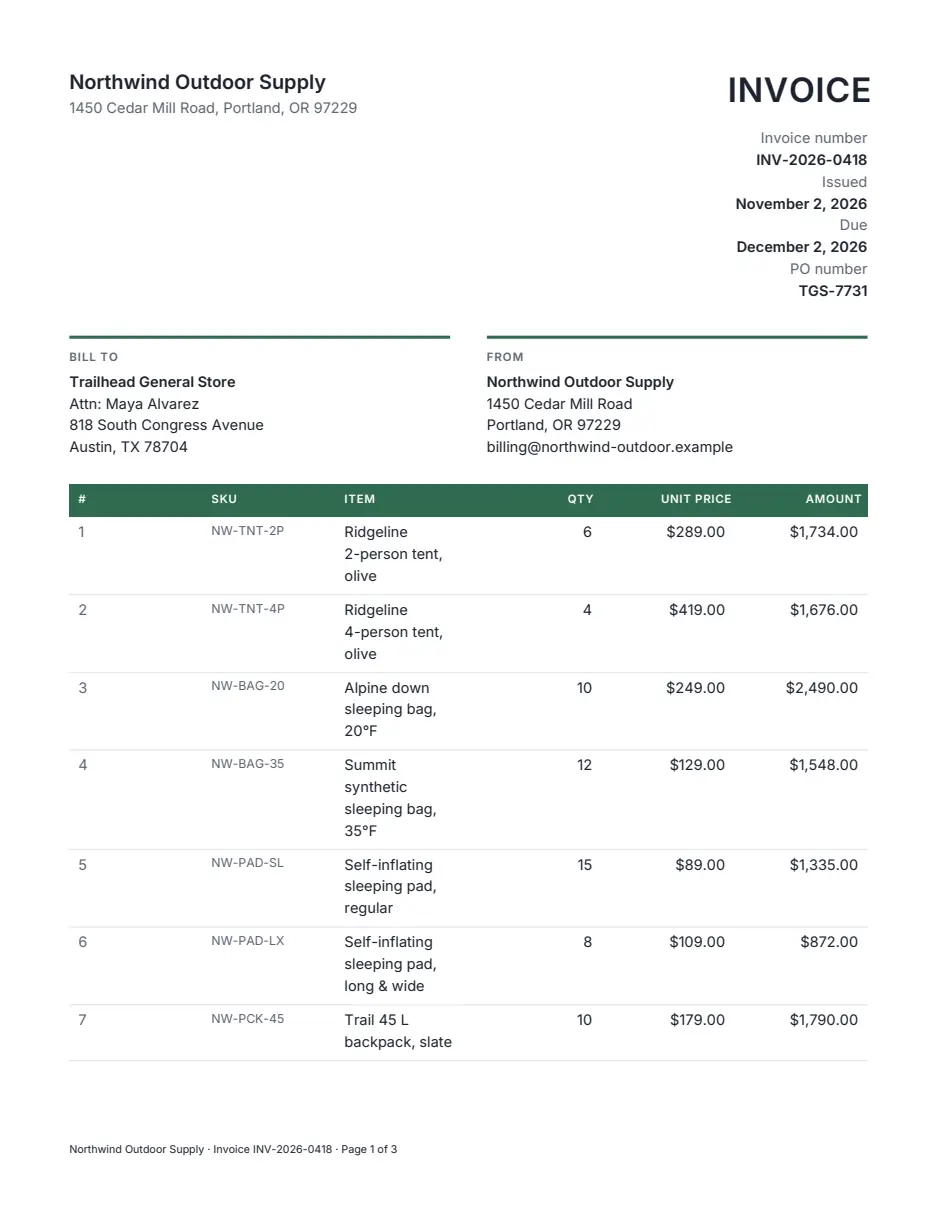
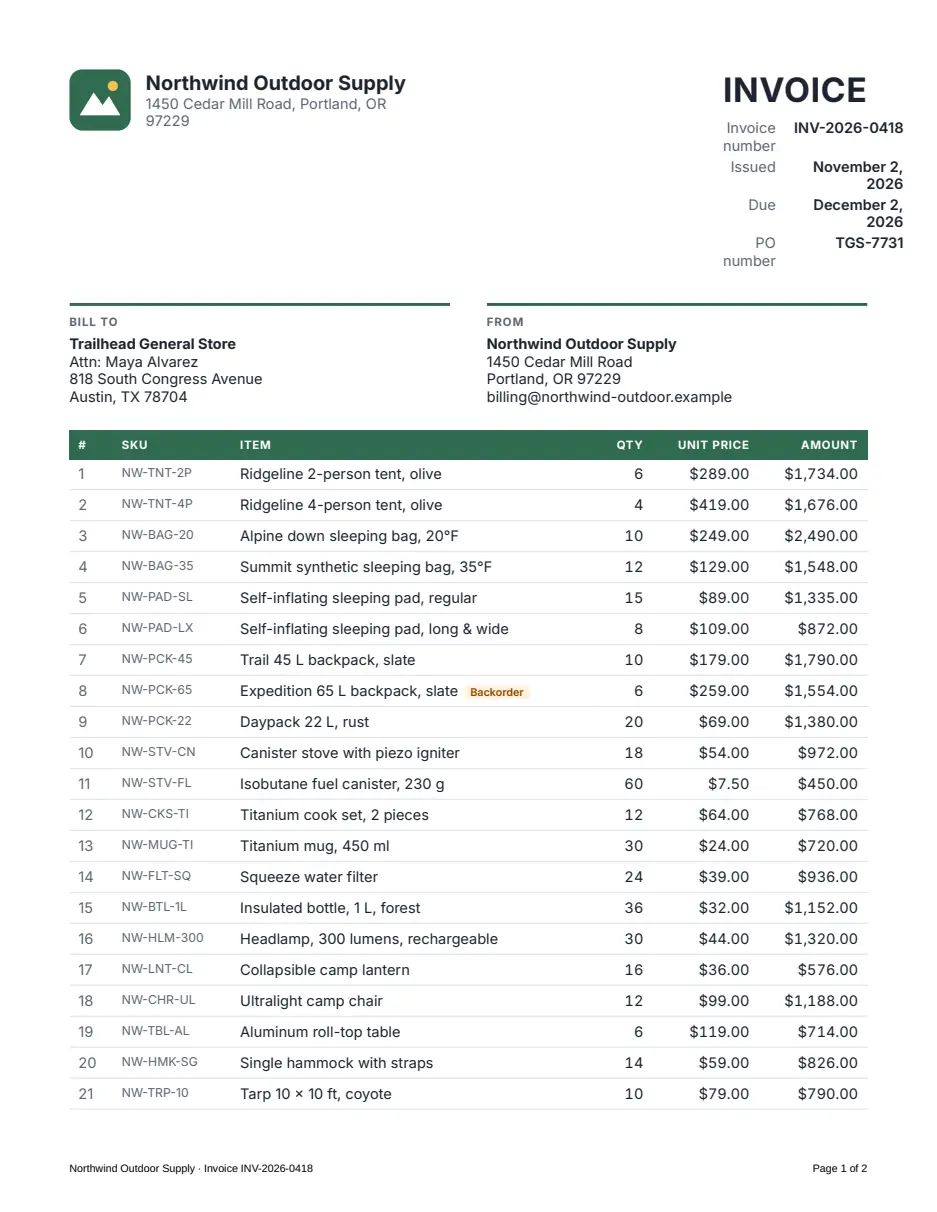
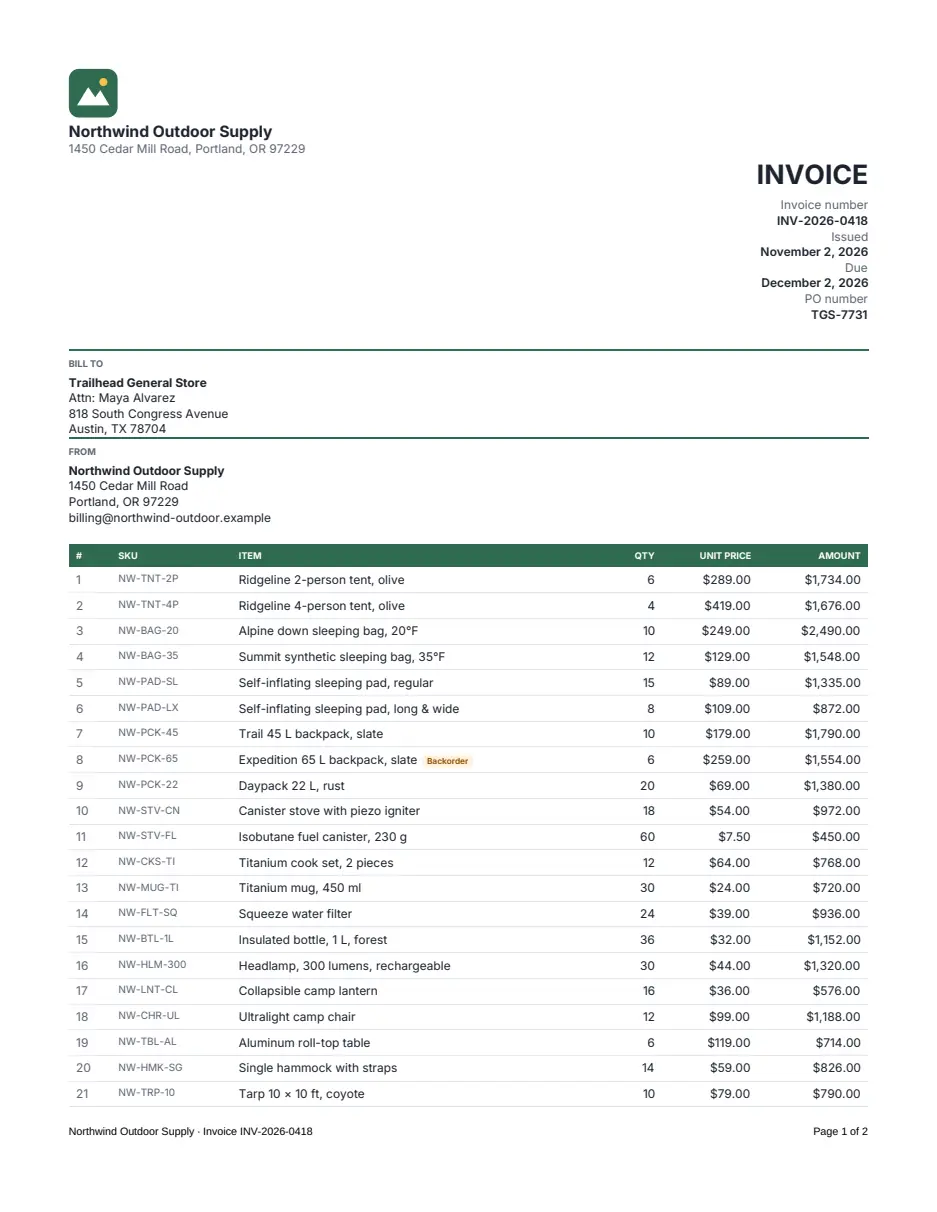
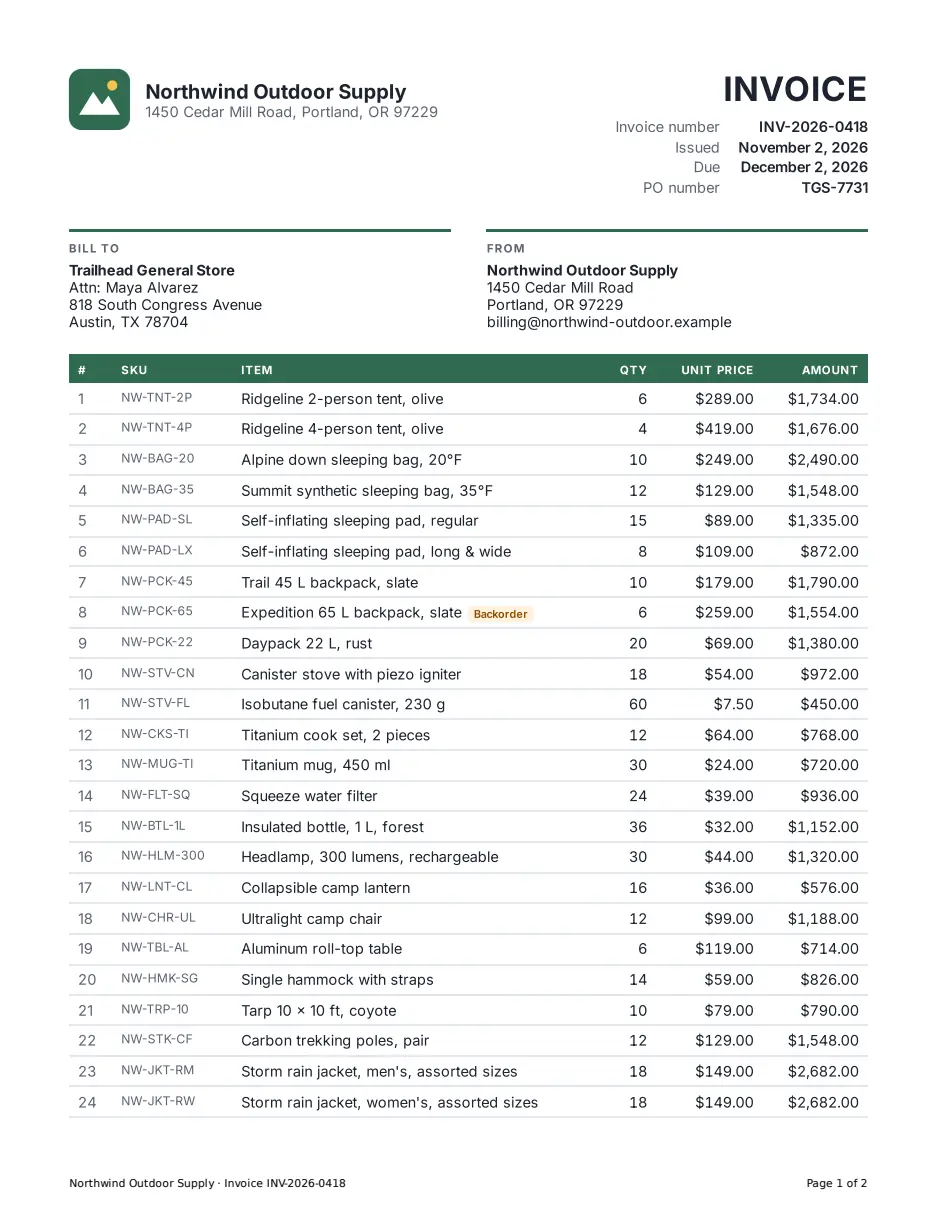
| xhtml2pdf 0.2.28 | WeasyPrint 70.0 | pdfkit 1.0 + wkhtmltopdf 0.12.6.1 | Playwright 1.65 | Dynamic Document API | |
|---|---|---|---|---|---|
| Rendering engine | Own, on ReportLab | Own layout engine | Qt WebKit | Chromium | Chromium |
| What you install | pip only | pip + Pango system libraries | pip + wkhtmltopdf binary (archived 2023) | pip + about 730 MB of browsers | pip only |
| Inline SVG logo | Missing | Yes | Yes | Yes | Yes |
| Layout as designed | No: blocks stacked, equal-width columns | Yes, one column wraps | No: Flexbox and grid ignored | Yes | Yes |
| Table header repeated | Yes | Yes | Yes | Yes | Yes |
| Page numbers via | <pdf:pagenumber> tags | CSS @page margin boxes | footer-right option | footer_template | pdf.footer |
| Runs JavaScript | No | No | Yes (old WebKit) | Yes | Yes |
| Pages | 3 | 2 | 2 | 2 | 2 |
How to choose:
- xhtml2pdf is pure Python and installs anywhere. It fits simple documents, mostly text and plain tables, where you can live without modern CSS.
- WeasyPrint is the strongest of the Python libraries in this test, and it supports print CSS such as
@pagerules and margin boxes. It doesn't run JavaScript, so charts drawn in the browser stay empty, and servers and Docker images need Pango installed. - pdfkit calls wkhtmltopdf, which is no longer maintained. Its old WebKit ignores Flexbox and grid. Don't start new projects on it; see wkhtmltopdf alternatives.
- Playwright prints with a real Chromium, so the PDF looks like the page in Chrome. You run the browser yourself: about 730 MB of downloads, memory per page, timeouts, and updates.
- An API such as Dynamic Document API gives you the Chromium result without running a browser, and adds a template language, page numbers from your data, retries and e-invoices. The HTML and data leave your server, and live renders count against a plan.
The rest of this tutorial uses the API.
How it works
Your code doesn't build the HTML. It sends the template and the data in one request, and Dynamic Document API fills the template, renders it in Chromium and returns the PDF:
invoice_data.pyreadsinvoice.jsonand calculates the line amounts and totals withDecimal.render_invoice.pysendsinvoice.htmlashtml, the invoice asdata, and the page settings aspdftoPOST /v1/pdf/from-html.- It downloads the finished PDF and writes it to
invoice-INV-2026-0418.pdf.
The template language uses Jinja syntax, so a template you would fill with Jinja2 works here as it is: loops, conditions, filters and Python's "{:,.2f}".format() behave the same. Values from your data are escaped on the server, so a customer named <b>Acme</b> can't break the layout.
1. The template
invoice.html is ordinary HTML and CSS with placeholders:
<!DOCTYPE html>
<html lang="en">
<head>
<meta charset="utf-8">
<title>Invoice {{ number }}</title>
<link rel="stylesheet" href="https://fonts.googleapis.com/css2?family=Inter:wght@400;600;700&display=swap">
<style>
  body { font-family: Inter, Arial, sans-serif; font-size: 9.5pt; color: #1d2330; margin: 0; }
  .muted { color: #5d6475; }

  /* Header: logo and seller on the left, invoice details on the right. */
  .top { display: flex; justify-content: space-between; align-items: flex-start; gap: 24pt; }
  .brand { display: flex; align-items: center; gap: 10pt; }
  .brand svg { width: 40pt; height: 40pt; }
  .brand b { display: block; font-size: 13pt; }
  .meta { text-align: right; }
  .meta h1 { font-size: 22pt; margin: 0 0 6pt; letter-spacing: .02em; }
  .meta dl { display: grid; grid-template-columns: auto auto; gap: 2pt 12pt; margin: 0; }
  .meta dt { color: #5d6475; }
  .meta dd { margin: 0; font-weight: 600; }

  .parties { display: flex; gap: 24pt; margin: 22pt 0 16pt; }
  .parties div { flex: 1; border-top: 2pt solid #2f6b4f; padding-top: 6pt; }
  .parties h2 { font-size: 7.5pt; text-transform: uppercase; letter-spacing: .08em; color: #5d6475; margin: 0 0 4pt; }

  /* Line items: the header row repeats on every page, rows never split. */
  table { width: 100%; border-collapse: collapse; }
  thead { display: table-header-group; }
  th { text-align: left; font-size: 7.5pt; text-transform: uppercase; letter-spacing: .06em; color: #fff; background: #2f6b4f; padding: 5pt 6pt; }
  td { padding: 4pt 6pt; border-bottom: 1px solid #e3e6ec; vertical-align: top; }
  tr { break-inside: avoid; }
  .num { text-align: right; font-variant-numeric: tabular-nums; white-space: nowrap; }
  .sku { color: #5d6475; font-size: 8pt; white-space: nowrap; }
  .badge { font-size: 7pt; font-weight: 600; color: #8a4b00; background: #fff1dc; border-radius: 3pt; padding: 1pt 4pt; margin-left: 4pt; }

  /* Totals and notes stay together at the end. */
  .end { display: flex; justify-content: space-between; gap: 24pt; margin-top: 14pt; break-inside: avoid; }
  .notes { flex: 1; font-size: 8.5pt; }
  .totals { width: 200pt; }
  .totals td { border: none; padding: 3pt 6pt; }
  .totals .due td { font-size: 12pt; font-weight: 700; border-top: 2pt solid #2f6b4f; padding-top: 6pt; }
</style>
</head>
<body>
  <div class="top">
    <div class="brand">
      <svg viewBox="0 0 48 48" aria-hidden="true">
        <rect width="48" height="48" rx="10" fill="#2f6b4f"/>
        <path d="M8 36 L19 18 L26 28 L31 21 L40 36 Z" fill="#fff"/>
        <circle cx="34" cy="13" r="4" fill="#f2c14e"/>
      </svg>
      <div>
        <b>{{ seller.name }}</b>
        <span class="muted">{{ seller.address | join(", ") }}</span>
      </div>
    </div>
    <div class="meta">
      <h1>INVOICE</h1>
      <dl>
        <dt>Invoice number</dt><dd>{{ number }}</dd>
        <dt>Issued</dt><dd>{{ issued }}</dd>
        <dt>Due</dt><dd>{{ due }}</dd>
        {% if po_number %}<dt>PO number</dt><dd>{{ po_number }}</dd>{% endif %}
      </dl>
    </div>
  </div>

  <div class="parties">
    <div>
      <h2>Bill to</h2>
      <b>{{ customer.name }}</b><br>
      Attn: {{ customer.contact }}<br>
      {% for line in customer.address %}{{ line }}<br>{% endfor %}
    </div>
    <div>
      <h2>From</h2>
      <b>{{ seller.name }}</b><br>
      {% for line in seller.address %}{{ line }}<br>{% endfor %}
      {{ seller.email }}
    </div>
  </div>

  <table>
    <thead>
      <tr><th>#</th><th>SKU</th><th>Item</th><th class="num">Qty</th><th class="num">Unit price</th><th class="num">Amount</th></tr>
    </thead>
    <tbody>
      {% for item in items %}
      <tr>
        <td class="muted">{{ loop.index }}</td>
        <td class="sku">{{ item.sku }}</td>
        <td>{{ item.description }}{% if item.backorder %}<span class="badge">Backorder</span>{% endif %}</td>
        <td class="num">{{ item.qty }}</td>
        <td class="num">${{ "{:,.2f}".format(item.unit_price) }}</td>
        <td class="num">${{ "{:,.2f}".format(item.amount) }}</td>
      </tr>
      {% endfor %}
    </tbody>
  </table>

  <div class="end">
    <p class="notes muted">{{ notes }}</p>
    <table class="totals">
      <tr><td>Subtotal</td><td class="num">${{ "{:,.2f}".format(totals.subtotal) }}</td></tr>
      <tr><td>Sales tax ({{ totals.tax_percent }}%)</td><td class="num">${{ "{:,.2f}".format(totals.tax) }}</td></tr>
      <tr><td>Shipping</td><td class="num">${{ "{:,.2f}".format(totals.shipping) }}</td></tr>
      <tr class="due"><td>Amount due</td><td class="num">${{ "{:,.2f}".format(totals.total) }}</td></tr>
    </table>
  </div>
</body>
</html>
The rules that control the pages:
| Rule | Effect |
|---|---|
thead { display: table-header-group; } | The header row repeats at the top of every page the table runs onto |
tr { break-inside: avoid; } | A line item is never cut in half at a page break |
.end { break-inside: avoid; } | Notes and totals move to the next page together instead of splitting |
More rules, and fixes for problems such as an empty last page: pagination basics. Instead of "{:,.2f}".format() you can also use the format_currency filter, which formats money for any currency and locale. It exists only in Dynamic Document API, though, so keep format if the same template should also run in Jinja2.
The data
invoice.json holds the invoice as it would come from your database: seller, customer, dates, the tax rate and 36 line items with quantity and unit price. Money is calculated in Python with Decimal, not in the template, so the PDF shows exactly the amounts your books have:
# invoice_data.py
import json
from datetime import date
from decimal import ROUND_HALF_UP, Decimal
from pathlib import Path

CENT = Decimal("0.01")
HERE = Path(__file__).parent


def money(value: Decimal) -> float:
    return float(value.quantize(CENT, rounding=ROUND_HALF_UP))


def long_date(iso: str) -> str:
    d = date.fromisoformat(iso)
    return f"{d:%B} {d.day}, {d.year}"  # November 2, 2026


def load_invoice(path: Path = HERE / "invoice.json") -> dict:
    invoice = json.loads(path.read_text(encoding="utf-8"))
    invoice["issued"] = long_date(invoice["issued"])
    invoice["due"] = long_date(invoice["due"])

    subtotal = Decimal("0")
    for item in invoice["items"]:
        amount = Decimal(item["unit_price"]) * item["qty"]
        subtotal += amount
        item["unit_price"] = money(Decimal(item["unit_price"]))
        item["amount"] = money(amount)

    tax_rate = Decimal(invoice["tax_rate"])
    shipping = Decimal(invoice["shipping"])
    tax = (subtotal * tax_rate).quantize(CENT, rounding=ROUND_HALF_UP)
    invoice["totals"] = {
        "subtotal": money(subtotal),
        "tax_percent": float(tax_rate * 100),
        "tax": money(tax),
        "shipping": money(shipping),
        "total": money(subtotal + tax + shipping),
    }
    return invoice
2. Render it with the Python SDK
Install the SDK. It runs on Python 3.9 and later, and its only dependency is httpx:
pip install dynamic-document-api
export DYNAMIC_DOCUMENT_API_KEY="dda_test_..."
render_invoice.py sends template, data and page settings in one call:
# render_invoice.py
from pathlib import Path

from dynamic_document_api import DynamicDocumentApi

from invoice_data import load_invoice

HERE = Path(__file__).parent

dda = DynamicDocumentApi()  # reads DYNAMIC_DOCUMENT_API_KEY
invoice = load_invoice()

render = dda.pdf.from_html(
    html=(HERE / "invoice.html").read_text(encoding="utf-8"),
    data=invoice,
    pdf={
        "paper": {"size": "Letter"},
        "margin": {"top": "16mm", "right": "16mm", "bottom": "20mm", "left": "16mm"},
        "footer": {
            "enabled": True,
            "left": "{{ seller.name }} · Invoice {{ number }}",
            "right": "Page {{page}} of {{pages}}",
            "height": "12mm",
        },
        "metadata": {"title": f"Invoice {invoice['number']}", "author": invoice["seller"]["name"]},
    },
    filename="invoice-{{ data.number }}.pdf",
)

# A render that takes longer than the sync wait answers 202 and finishes in the background.
if render["status"] != "succeeded":
    render = dda.wait_for_render(render["id"])

file = render["files"][0]
Path(file["filename"]).write_bytes(dda.files.download(file))
print(f"Wrote {file['filename']} ({file['pages']} pages)")
Run it:
python render_invoice.py
# Wrote invoice-INV-2026-0418.pdf (2 pages)
dda.pdf.from_html returns the render as a dict: its id, its status and the files with a signed download URL, valid for one hour by default. dda.files.download fetches the file. The filename is a template too, filled from your data. With a test key the request is free and the PDF has a TEST watermark; a live key (dda_live_…) produces the clean document.
3. Page size, margins and page numbers
Everything about the page goes in the pdf object, see PDF options:
| Option | Here | Effect |
|---|---|---|
paper.size | "Letter" | US Letter. "A4", "Legal" and other sizes work too, or your own width and height |
margin | 16 mm, 20 mm at the bottom | The space around the content; the footer sits in the bottom margin |
footer.left, footer.right | Seller and invoice number, page count | Simple mode: three text slots, filled with the template language |
{{page}}, {{pages}} | Page 1 of 2 | The current page and the total, inserted while the PDF is printed |
metadata | Title and author | Shown in the PDF viewer's document properties |
The footer reads {{ seller.name }} and {{ number }} from the same data as the page. For a logo in the header or your own layout, switch to HTML mode, see headers and footers.
Without the SDK: plain requests
If you'd rather not add a dependency, the same render is one POST. With "delivery": "binary", the PDF comes back directly in the response body:
# render_requests.py
import os
from pathlib import Path

import requests

from invoice_data import load_invoice

HERE = Path(__file__).parent
invoice = load_invoice()

response = requests.post(
    "https://api-eu.dynamicdocumentapi.com/v1/pdf/from-html",
    headers={"Authorization": f"Bearer {os.environ['DYNAMIC_DOCUMENT_API_KEY']}"},
    json={
        "html": (HERE / "invoice.html").read_text(encoding="utf-8"),
        "data": invoice,
        "pdf": {
            "paper": {"size": "Letter"},
            "margin": {"top": "16mm", "right": "16mm", "bottom": "20mm", "left": "16mm"},
            "footer": {"enabled": True, "right": "Page {{page}} of {{pages}}", "height": "12mm"},
        },
        "delivery": "binary",
    },
    timeout=130,  # a little above the longest sync wait, so a slow render answers 202 instead of timing out
)

if response.status_code != 200:
    raise SystemExit(f"Render failed: {response.status_code} {response.text}")

Path("invoice.pdf").write_bytes(response.content)
print(f"Wrote invoice.pdf ({response.headers.get('X-Pages')} pages)")
What the SDK adds on top: retries for 429, 5xx and network errors with backoff, an idempotency key on every POST so a retry never renders twice, typed errors, and helpers to wait for a render and to download files. See SDKs and integrations.
Already using Jinja2?
If your project fills its templates with Jinja2 already, for example with custom filters or template inheritance from disk, render the HTML yourself and turn templating off, so the API takes the HTML exactly as it is:
# render_local_jinja.py
from pathlib import Path

from dynamic_document_api import DynamicDocumentApi
from jinja2 import Environment, FileSystemLoader, select_autoescape

from invoice_data import load_invoice

HERE = Path(__file__).parent

env = Environment(loader=FileSystemLoader(HERE), autoescape=select_autoescape(["html"]))
html = env.get_template("invoice.html").render(**load_invoice())

dda = DynamicDocumentApi()
render = dda.pdf.from_html(
    html=html,
    templating=False,  # the HTML is final: {{ }} in it is printed as text, not filled in again
    pdf={
        "paper": {"size": "Letter"},
        "margin": {"top": "16mm", "right": "16mm", "bottom": "20mm", "left": "16mm"},
        "footer": {"enabled": True, "right": "Page {{page}} of {{pages}}", "height": "12mm"},
    },
)
if render["status"] != "succeeded":
    render = dda.wait_for_render(render["id"])

Path("invoice-local.pdf").write_bytes(dda.files.download(render["files"][0]))
Both ways produce the same invoice. Sending template and data keeps layout and data apart, so you can later move the template into the dashboard and send only its ID and the data.
Serve the PDF from FastAPI
In a web app, the PDF is usually a download link. app.py renders the invoice on request with the asynchronous client and returns it from a FastAPI route. renders.create_binary gets the file in the response body, so there is no second download:
# app.py
from pathlib import Path

from dynamic_document_api import AsyncDynamicDocumentApi, DynamicDocumentApiError
from fastapi import FastAPI, HTTPException
from fastapi.responses import Response

from invoice_data import load_invoice

HERE = Path(__file__).parent
TEMPLATE = (HERE / "invoice.html").read_text(encoding="utf-8")

app = FastAPI()
dda = AsyncDynamicDocumentApi()  # one client for the whole app: it reuses connections


@app.get("/invoices/{number}.pdf")
async def invoice_pdf(number: str) -> Response:
    invoice = load_invoice()  # in a real app: load the invoice from your database
    if number != invoice["number"]:
        raise HTTPException(status_code=404, detail="Invoice not found")

    try:
        pdf = await dda.renders.create_binary(
            input={"type": "html", "html": TEMPLATE},
            data=invoice,
            output={
                "format": "pdf",
                "pdf": {
                    "paper": {"size": "Letter"},
                    "margin": {"top": "16mm", "right": "16mm", "bottom": "20mm", "left": "16mm"},
                    "footer": {"enabled": True, "right": "Page {{page}} of {{pages}}", "height": "12mm"},
                },
            },
        )
    except DynamicDocumentApiError as error:
        raise HTTPException(status_code=502, detail=f"PDF rendering failed ({error.code})") from error

    return Response(
        content=pdf.content,
        media_type="application/pdf",
        headers={"Content-Disposition": f'inline; filename="invoice-{number}.pdf"'},
    )
pip install fastapi uvicorn
uvicorn app:app --reload
# open http://127.0.0.1:8000/invoices/INV-2026-0418.pdfThe route awaits the render, so the server keeps handling other requests in the meantime. inline opens the PDF in the browser; use attachment to download it instead. In Flask or Django, use the synchronous DynamicDocumentApi with the same call.
Going to production
- Handle errors by type. Every error is a subclass of
DynamicDocumentApiErrorwith the API'scodeand arequest_idyou can quote to support. For example,RenderFailedErrormeans the template itself failed,RenderLimitReachedErrorthat the Free plan's renders are used up, andRateLimitErrorthat you send too many at once. All codes: errors. - Retries are built in. The SDK retries network errors,
429and5xxwith backoff and honoursRetry-After. When your own job queue retries a whole job, pass a key derived from the invoice, such asidempotency_key=f"invoice-{invoice['number']}", so the retry returns the first result instead of a second PDF. - Long documents. A render waits synchronously up to your plan's sync timeout (30 seconds on Free, up to 120 seconds on higher plans). After that the API answers
202and the render continues;dda.wait_for_renderpicks up the result, as inrender_invoice.py. Binary responses are limited to 20 MB; for larger files, use the download URL. Limits per plan: plans and limits. - Many documents. For a monthly invoice run, send renders with
mode="async"and awebhook_url, and store each PDF when the webhook arrives, or, on paid plans, send them all at once as a batch. - Store the template. Save
invoice.htmlas a template in the dashboard and calldda.pdf.from_template(template_id=..., data=invoice). Templates are versioned, so a design change never breaks a running integration. - Go live. Swap the test key for a live key. Test renders are free and their files are deleted after 24 hours; the Free plan includes 50 live renders a month.
Frequently asked questions
How do I convert HTML to PDF in Python without wkhtmltopdf?
Use one of the other three options from the comparison: WeasyPrint for print-oriented HTML without JavaScript, Playwright if you can run Chromium yourself, or an HTML to PDF API that runs Chromium for you. xhtml2pdf works for simple layouts. wkhtmltopdf has been archived since January 2023 and its WebKit doesn't support Flexbox or grid; the wkhtmltopdf alternatives page covers the migration.
Does WeasyPrint run JavaScript?
No. In our test, a page whose script writes "yes" into the document still said "no" in WeasyPrint's PDF, and the same in xhtml2pdf's. Content that JavaScript builds, such as charts or client-rendered tables, doesn't appear. Render it to static HTML or SVG first, or use a Chromium-based renderer. The API runs JavaScript and can wait until your charts are drawn.
How do I add page numbers to a PDF generated from HTML in Python?
It depends on the tool: CSS @page margin boxes with counter(page) and counter(pages) in WeasyPrint, footer_template with the pageNumber and totalPages classes in Playwright, [page] and [topage] in pdfkit's footer-right option, and <pdf:pagenumber> tags in xhtml2pdf. With the API, put {{page}} and {{pages}} into pdf.footer or pdf.header, as in step 3.
Can I convert a URL instead of an HTML string?
Yes. dda.pdf.from_url(url="https://example.com/invoices/42", pdf={...}) loads the page in Chromium and prints it with the same page options. For pages behind a login, the request can carry headers, cookies or basic auth for that site.
Is it free to try?
Yes. Test keys are free on every plan and add a TEST watermark. The Free plan includes 50 live renders a month, no card needed. Create an account.
Next steps
- Long reports. The Node.js tutorial builds a nine-page report with long tables, a new page per section and a running header; the same options work from Python.
- E-invoices. Add a ZUGFeRD / Factur-X XML to the same invoice PDF, see ZUGFeRD and Factur-X invoices.
- The product pages: HTML to PDF API and invoice PDF API.
Related: template language, PDF options, pagination basics, headers and footers, SDKs and integrations.
ZUGFeRD, Factur-X and XRechnung invoices with an API
Turn JSON into a ZUGFeRD / Factur-X invoice PDF or an XRechnung with a REST API, checked by the official KoSIT and veraPDF validators. From an invoice template to the first e-invoice with cURL, Node.js, Python or Postman, plus how to check the e-invoices you receive.
HTML to PDF in C# and .NET: an invoice from ASP.NET Core
Convert HTML to PDF in C#. Render an invoice with HttpClient or a Razor component, stream it from ASP.NET Core, and see how PuppeteerSharp, iText, HtmlRenderer and DinkToPdf compare.