Alternatives
wkhtmltopdf alternative: what to use now that it is archived
wkhtmltopdf turned HTML into PDF for more than a decade, and many invoice and report pipelines still run on it. Its repository has been archived since January 2023, and its engine is the WebKit of Qt 4.8. We rendered the same two HTML files with wkhtmltopdf 0.12.6 and with headless Chrome: twelve of twelve modern CSS and JavaScript features failed in wkhtmltopdf and worked in Chrome.
Below are the results, the alternatives, and a table that maps every common wkhtmltopdf option to an API parameter. The test files are public, so you can repeat it.
| Status | Repository archived on 2 January 2023; last release 0.12.6 on 10 June 2020 |
|---|---|
| Engine | WebKit from Qt 4.8, according to the project not updated since 2012 |
| Security | CVE-2022-35583 (server-side request forgery, CVSS 9.8) affects 0.12.6; no release fixes it |
| Our test | 12 of 12 modern features failed in wkhtmltopdf 0.12.6 and worked in Chrome 156; two controls in older syntax worked in both |
| Named by the project | WeasyPrint, Prince and Puppeteer as alternatives |
| Moving to an API | Page size, margins, headers, footers, media type and JavaScript waits all have a parameter; see the table |
Is wkhtmltopdf still maintained?
No. The main repository, wkhtmltopdf/wkhtmltopdf, was archived on 2 January 2023, and the
packaging repository that builds the binaries followed on 28 August 2023. The last release is 0.12.6
from 10 June 2020; the 0.12.7 that the
project's status page announced never appeared. The same page
explains why: wkhtmltopdf is built on QtWebKit, Qt 4 has not been supported since 2015, and QtWebKit was
removed from Qt in 2016.
Two vulnerabilities matter if you still run it:
- CVE-2020-21365 (CVSS 7.5): versions up to 0.12.5 let crafted HTML read local files. That
is why 0.12.6 blocks local file access by default, and why so many configurations carry
--enable-local-file-access, which opens it again. - CVE-2022-35583 (CVSS 9.8): in 0.12.6, an
iframein the HTML makes the server request any address, including internal ones. There is no release after 0.12.6, so there is no fix.
The status page puts it plainly: do not use wkhtmltopdf with any untrusted HTML. For new work it recommends WeasyPrint, Prince or Puppeteer.
The test: same HTML, two engines
We wrote two self-contained HTML files, with the font embedded so neither engine had to load anything:
- A feature test with twelve CSS and JavaScript features that templates use today, plus two controls written the way older engines expect. Where a test can check itself, it turns green when the feature works and stays red when it does not.
- A two-page invoice written like a current template: a flexbox header, a grid address block, CSS variables for the brand colour, a WOFF2 web font, a table that runs over a page break and a due date set by a short script.
Both files went through wkhtmltopdf 0.12.6 (with patched Qt), the official macOS build, with
its default settings apart from A4 and 15 mm margins, and through Chrome 156.0.8078.76,
headless, with Playwright's page.pdf(), A4, the same margins and backgrounds on. Our API's engine
(2026.4) runs Chrome 153; every feature in the test is far older than either version.
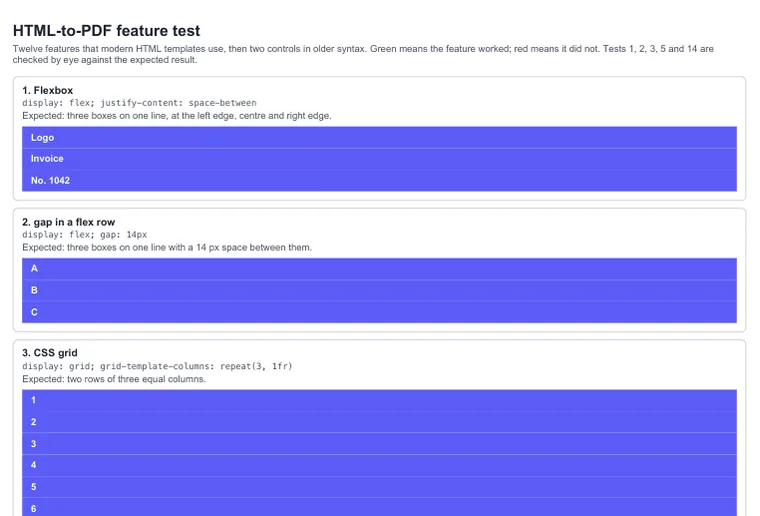
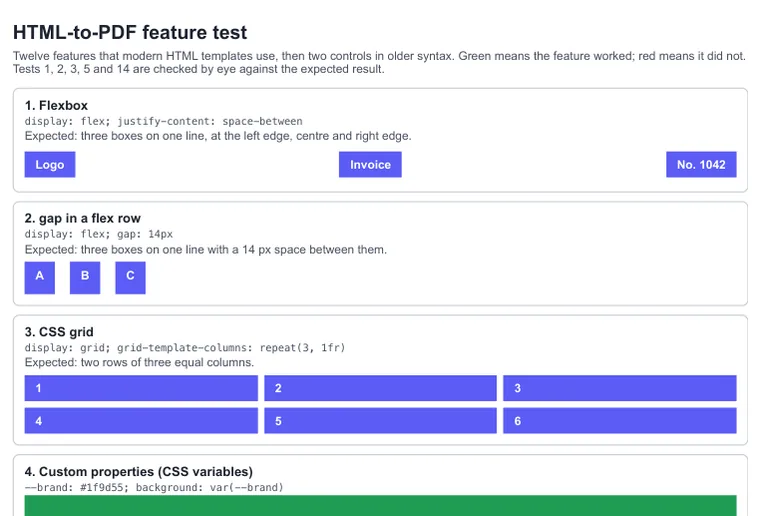
| Test | wkhtmltopdf 0.12.6 | Chrome 156 |
|---|---|---|
1. Flexboxdisplay: flex | Failed: boxes stacked | Worked |
| 2. gap in a flex row | Failed: boxes stacked, no gap | Worked |
3. CSS gridgrid-template-columns | Failed: one column of six boxes | Worked |
4. CSS variablesvar(--brand) | Failed: fallback colour | Worked |
| 5. WOFF2 web font | Failed: fell back to Georgia | Worked |
6. calc() | Failed | Worked |
7. clamp() | Failed | Worked |
8. rgb(31 157 85 / 100%) | Failed | Worked |
9. :is() selector | Failed | Worked |
10. aspect-ratio | Failed | Worked |
11. JavaScript from 2015 onconst, arrow functions, template literals | Failed: the script did not run | Worked |
12. Intl.NumberFormat | Failed: Intl does not exist | Worked |
| 13. Control: JavaScript in ES5 syntax | Worked | Worked |
14. Control: display: -webkit-box | Worked | Worked |
The controls matter: wkhtmltopdf is not broken for the HTML it was built for. A template written years ago
with -webkit-box, floats and ES5 scripts still renders. What fails is CSS and JavaScript written in the
last decade, which is what designers, frameworks and code generators produce today.
What breaks in a real template
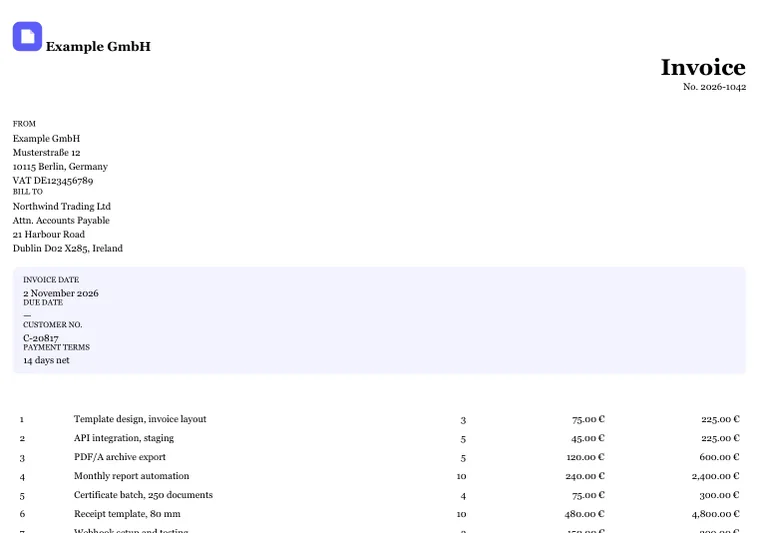
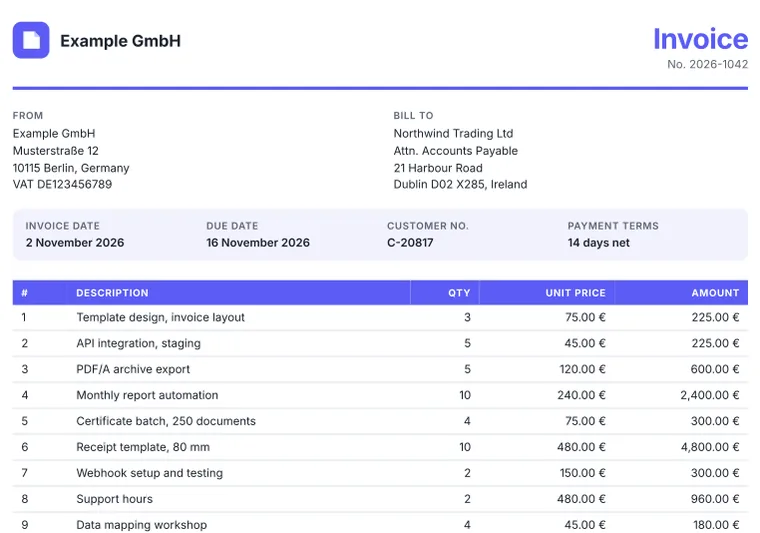
- The layout collapses. Logo and invoice title no longer share a line; sender, recipient and the four invoice details are stacked instead of side by side.
- Every colour from a variable is gone. The brand line under the header, the coloured title and the table header's background disappear. The header text is white, so the column titles become invisible.
- The font changes. The WOFF2 file is ignored, and the whole invoice falls back to Georgia.
- Script output is missing. The due date stays empty because the script uses
const, which the engine cannot parse. - Everything is a little smaller. wkhtmltopdf's default "smart shrinking" scales the page; we kept the default, as most installations do.
Chrome rendered the invoice as designed and repeated the table header at the top of page 2.
The alternatives compared
Which replacement fits depends on whether your HTML needs JavaScript and where the PDFs may be generated.
| Option | Engine | JavaScript | Runs | Good fit when |
|---|---|---|---|---|
| WeasyPrint | Its own layout engine (Python), strong on print CSS; BSD licence | No | On your servers | Reports from HTML you control, without scripts |
| Prince | Its own engine, strong on print CSS; commercial licence | Limited | On your servers | Publishing-grade print layout with a budget for licences |
| Puppeteer or Playwright | Chrome; Apache 2.0 licence | Yes | On your servers | You already run browsers, or documents must not leave your network |
| Gotenberg | Chrome (and LibreOffice) behind an HTTP API in Docker; MIT licence | Yes | On your servers | You want an API but must host it yourself |
| Hosted HTML-to-PDF API, e.g. Dynamic Document API | Chrome, kept current by the provider (ours: engine 2026.4, Chrome 153) | Yes, with wait conditions | At the provider (ours: EU, servers in Germany) | You want modern output without running or patching a browser |
Prince and WeasyPrint lay out pages better than browsers in some print details, such as footnotes or running headers built in CSS, but neither runs a modern JavaScript engine. If your templates use charts or client-side formatting, a Chrome-based option is the safer migration. Moving to self-hosted Chrome means operating the browser yourself: updates every few weeks, fonts, memory and stuck processes. A hosted API moves that work to the provider. Dynamic Document API's free plan includes 50 renders a month without a credit card; paid plans start at €15 a month, billed annually. In our render-time benchmark a one-page invoice took a median of 124 ms in the renderer.
From wkhtmltopdf options to API parameters
Most wkhtmltopdf command lines translate one to one. The left column is the wkhtmltopdf option; the right
column is the field in Dynamic Document API's pdf object, or the request field named.
| wkhtmltopdf | Dynamic Document API |
|---|---|
--page-size A4, -O Landscape | paper.size: "A4", orientation: "landscape" |
--page-width, --page-height | paper.width, paper.height (CSS lengths, such as "80mm") |
-T, -B, -L, -R | margin.top, margin.bottom, margin.left, margin.right |
--header-center "Page [page] of [topage]" | header.center: "Page {{page}} of {{pages}}"; also left and right |
--footer-center, --footer-left, --footer-right | footer.center, footer.left, footer.right |
[date], [title] | {{date}}, {{title}} |
--header-html, --footer-html | header.html, footer.html; elements with the classes page and pages receive the numbers |
| Default (screen media) | emulate_media: "screen" |
--print-media-type | The default (emulate_media: "print") |
--no-background | print_background: false |
--disable-javascript | javascript: false |
--javascript-delay 2000 | wait.until: "delay", wait.delay_ms: 2000; better: "networkidle" or "selector" |
--window-status ready | wait.until: "ready_flag", and your script sets window.__DYNAMIC_DOCUMENT_API_READY__ = true |
--zoom 1.2 | scale: 1.2 (0.1 to 2.0) |
--outline | outline: true (bookmarks from h1 to h6) |
--title | metadata.title |
--cookie, --custom-header, --username/--password | For a URL: http.cookies, http.headers, http.basic_auth |
--enable-local-file-access | Not needed: put CSS and images in the HTML, or link them by HTTPS URL |
--disable-smart-shrinking | Not needed: Chrome does not shrink; use scale if you relied on it |
Three things have no direct counterpart: the generated table of contents page
(toc; use outline for PDF bookmarks or build the list in your HTML), the
[section] and [subsection] placeholders, and --dpi, which Chrome does not need
for vector output. All options: PDF options and
headers and footers.
Before and after: the code
From the command line
Before, with wkhtmltopdf:
wkhtmltopdf --page-size A4 -T 20mm -B 20mm --print-media-type \
  --footer-center "Page [page] of [topage]" \
  invoice.html invoice.pdf
After, with Dynamic Document API. jq wraps the HTML file in the JSON request; print media is
the default, so it needs no option:
jq -n --rawfile html invoice.html '{
  html: $html,
  pdf: {
    paper:  { size: "A4" },
    margin: { top: "20mm", bottom: "20mm" },
    footer: { enabled: true, center: "Page {{page}} of {{pages}}" }
  },
  delivery: "binary"
}' | curl https://api.dynamicdocumentapi.com/v1/pdf/from-html \
  -H "Authorization: Bearer $DYNAMIC_DOCUMENT_API_KEY" \
  -H "Content-Type: application/json" \
  -d @- --output invoice.pdf
From Python (pdfkit)
Before:
import pdfkit

pdfkit.from_file("invoice.html", "invoice.pdf",
                 options={"page-size": "A4", "margin-top": "20mm", "margin-bottom": "20mm"})
After, with requests:
import os
import requests

with open("invoice.html", encoding="utf-8") as f:
    html = f.read()

res = requests.post(
    "https://api.dynamicdocumentapi.com/v1/pdf/from-html",
    headers={"Authorization": f"Bearer {os.environ['DYNAMIC_DOCUMENT_API_KEY']}"},
    json={
        "html": html,
        "pdf": {"paper": {"size": "A4"}, "margin": {"top": "20mm", "bottom": "20mm"}},
        "delivery": "binary",
    },
    timeout=60,
)
res.raise_for_status()
with open("invoice.pdf", "wb") as f:
    f.write(res.content)
One difference to plan for: wkhtmltopdf reads images and stylesheets from your disk, an API cannot. Put the CSS in the HTML, embed small images as data URIs, and link larger ones by HTTPS URL. If you render the same layout again and again, store it once as a template and send only the data.
pdfkit, Snappy, wicked_pdf and other wrappers
Many projects never call wkhtmltopdf directly. They use a library that does:
- Python: pdfkit
- Ruby: PDFKit and wicked_pdf
- PHP: KnpLabs Snappy and laravel-snappy
- .NET: DinkToPdf and Rotativa
- Node.js: the
wkhtmltopdfpackage
Some of these libraries are still updated, but all of them run the same archived engine underneath, so they share every result in the test above. Switching from one wrapper to another changes nothing. Replace the renderer: the request in the previous section works from any language that can send an HTTPS request, and our SDKs and integrations wrap it for you.
If you have to keep wkhtmltopdf for now
Migrations take time. Until yours is done, limit the risk:
- Render only HTML you control. Never pass user-supplied HTML, Markdown converted to HTML, or third-party URLs to wkhtmltopdf.
- Keep local file access off. If you need
--enable-local-file-access, allow only one directory with--allow. - Isolate the process. Run it in a container without access to your internal network, so the request forgery in CVE-2022-35583 has nothing to reach. The project's status page also suggests AppArmor or SELinux.
- Write for the old engine. Use
display: -webkit-boxor floats instead of flexbox and grid, plain colours instead of variables, ES5 scripts, and fonts installed on the machine.
Questions
Is wkhtmltopdf still maintained?
No. The wkhtmltopdf repository on GitHub was archived on 2 January 2023, and the last release is 0.12.6 from 10 June 2020. No further fixes, including security fixes, are coming. The project's own status page names WeasyPrint, Prince and Puppeteer as alternatives.
What is the best alternative to wkhtmltopdf?
It depends on your HTML. For reports without JavaScript, WeasyPrint (open source) or Prince (commercial) handle print CSS well. For modern CSS and JavaScript on your own servers, use headless Chrome through Puppeteer or Playwright, or Gotenberg in Docker. If you would rather not run a browser at all, a hosted HTML-to-PDF API such as Dynamic Document API renders with current Chromium; its free plan includes 50 renders a month.
Does wkhtmltopdf support flexbox and CSS grid?
Not in the current syntax. In our test with wkhtmltopdf 0.12.6, display: flex, gap and display: grid were ignored and the boxes stacked vertically. Only the 2009 flexbox syntax, display: -webkit-box, worked.
Is wkhtmltopdf safe to use?
Only with HTML you control, and isolated. CVE-2022-35583, a server-side request forgery through an iframe rated 9.8 (critical) by NVD, affects version 0.12.6, and no release fixes it. The project's status page warns against using wkhtmltopdf with any untrusted HTML.
Why does switching from pdfkit to another wkhtmltopdf wrapper not help?
pdfkit (Python and Ruby), Snappy and laravel-snappy (PHP), wicked_pdf (Ruby), DinkToPdf and Rotativa (.NET) all call the wkhtmltopdf binary or library. They share its engine, so they share its limits. To get modern CSS and JavaScript, replace the renderer, not the wrapper.
How do I convert wkhtmltopdf headers and footers?
In Dynamic Document API, --header-center and --footer-center become pdf.header.center and pdf.footer.center, with {{page}} for [page] and {{pages}} for [topage]. --header-html and --footer-html become pdf.header.html and pdf.footer.html, where elements with the classes page and pages receive the numbers.
Test files and citation
- Test files, script and results (ZIP): both HTML files, the Chrome script, the commands and the four PDFs
- Feature test as PDF: wkhtmltopdf, Chrome
- Invoice as PDF: wkhtmltopdf, Chrome
- This page as Markdown, for language models and your own notes
The test files and results are licensed under CC BY 4.0: use them in your own articles, migration guides and slides, as long as you name Dynamic Document API and link to this page. A suggested citation:
Dynamic Document API (2026). wkhtmltopdf vs. Chrome: HTML-to-PDF test, November 2026. https://dynamicdocumentapi.com/alternatives/wkhtmltopdf/
Found a mistake, or a feature you would like to see tested? Write to support@dynamicdocumentapi.com.
Replace wkhtmltopdf with one API request
Current Chromium, nothing to install or patch. 50 renders a month on the free plan, no credit card.
Start free