Benchmark
Render-time benchmark
How long does it take to turn HTML, Markdown or a web page into a PDF? We rendered six everyday documents 100 times each against our production API in the EU and timed every render on three clocks: in the renderer, in the API and on the calling machine. At the median, a one-page invoice took 124 ms in the renderer and 336 ms end to end. The documents, the script and the raw data are public, so you can check every number and run the test yourself.
| One-page invoice | 124 ms in the renderer, 336 ms end to end (median) |
|---|---|
| 20-page catalog | 276 ms in the renderer, 619 ms end to end (median) |
| Web page to PDF | 2.8 s in the renderer, most of it loading the page |
| Waiting for a renderer | 5 ms or less at the median, 9 ms or less at p95 |
| Renders | 600 measured, 100 per document, one at a time. 598 succeeded; the other 2 got no response because the connection was reset, and are not part of the numbers. |
| Setup | Production API in the EU (servers in Germany), engine 2026.4 with Chrome 153, live API key (no watermark), client: a laptop in Germany |
Results
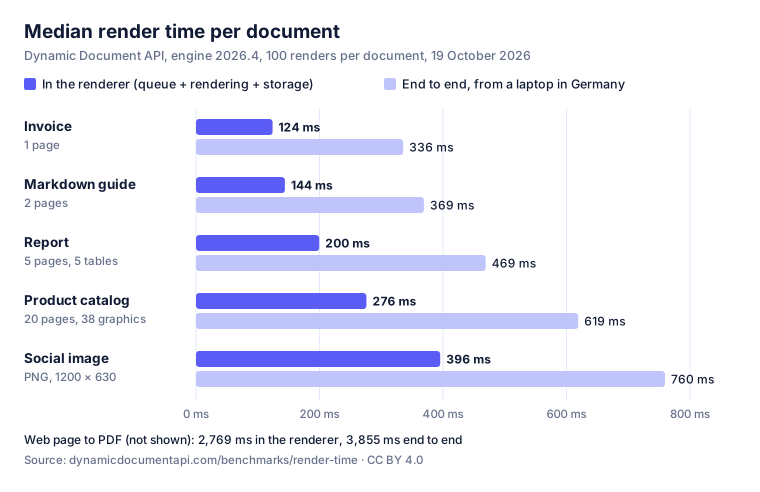
Time in the renderer
total_ms: from the moment the job is queued until the finished file is stored,
measured by the render worker. This is the number our product pages quote.
| Document | Median | p90 | p95 | Max |
|---|---|---|---|---|
| Invoice 1 page, HTML template + JSON | 124 ms | 170 ms | 185 ms | 204 ms |
| Markdown guide 2 pages, GitHub theme | 144 ms | 203 ms | 229 ms | 258 ms |
| Report 5 pages, 5 tables, page numbers | 200 ms | 251 ms | 270 ms | 287 ms |
| Product catalog 20 pages, cover, 38 SVG graphics | 276 ms | 323 ms | 326 ms | 475 ms |
| Social image PNG, 1200 × 630 | 396 ms | 449 ms | 473 ms | 554 ms |
| Web page to PDF our homepage, 12 pages | 2,769 ms | 2,938 ms | 3,069 ms | 3,322 ms |
End to end, as the caller saw it
client_ms: from sending the request until the last byte of the file arrived on a
laptop in Germany. The last two columns split the median: what the API itself added
(authentication, validation, handing the job over, streaming the file back) and what the network
added (round trips and the download).
| Document | File | Median | p95 | API | Network |
|---|---|---|---|---|---|
| Invoice 1 page, HTML template + JSON | 36 KB | 336 ms | 544 ms | 69 ms | 120 ms |
| Markdown guide 2 pages, GitHub theme | 64 KB | 369 ms | 566 ms | 69 ms | 146 ms |
| Report 5 pages, 5 tables, page numbers | 90 KB | 469 ms | 1,380 ms | 71 ms | 164 ms |
| Product catalog 20 pages, cover, 38 SVG graphics | 397 KB | 619 ms | 1,178 ms | 74 ms | 249 ms |
| Social image PNG, 1200 × 630 | 455 KB | 760 ms | 1,186 ms | 73 ms | 267 ms |
| Web page to PDF our homepage, 12 pages | 3.0 MB | 3,855 ms | 5,300 ms | 116 ms | 919 ms |
API and network are medians of the per-render differences api_ms − total_ms
and client_ms − api_ms. Medians do not add up exactly.
Where the time goes
The renderer reports each stage of every job. Medians in milliseconds:
| Document | Queue | Template | Rendering | Finishing | Storage | Total |
|---|---|---|---|---|---|---|
| Invoice | 2 ms | <1 ms | 91 ms | <1 ms | 19 ms | 124 ms |
| Markdown guide | 2 ms | <1 ms | 111 ms | 1 ms | 15 ms | 144 ms |
| Report | 5 ms | 1 ms | 166 ms | 1 ms | 17 ms | 200 ms |
| Product catalog | 4 ms | 2 ms | 230 ms | 3 ms | 21 ms | 276 ms |
| Social image | 2 ms | <1 ms | 307 ms | 54 ms | 27 ms | 396 ms |
| Web page to PDF | 2 ms | <1 ms | 2,644 ms | 45 ms | 65 ms | 2,769 ms |
Template: filling the HTML or Markdown with the JSON data. Rendering: Chromium loading, laying out and printing the page. Finishing: PDF clean-up or PNG encoding. Storage: writing the file to object storage in the region. The total also holds a few milliseconds of hand-over between the stages. The web page capture additionally spent 726 ms (summed) on fetching the page's assets, in parallel and inside its rendering time.
What the numbers say
- Pages are cheap; each render has a fixed part. Twenty times the pages took 2.2 times as long: 124 ms for one page, 200 ms for five, 276 ms for twenty, so each further page added about 8 ms. Most of a render is the same work whatever the length: loading the page in Chromium, laying it out, writing the file.
- For small documents, the network is the largest part of the wait. Of the 336 ms the caller waited for the invoice, the renderer accounted for 124 ms. The rest was the API (69 ms) and the way there and back (120 ms). Calling from a server close to the region shortens exactly that part; this benchmark already reused its HTTPS connection.
- The tail comes from the network, not the renderer. In the renderer, p95 stayed within 1.6 times the median for every document. End to end, the report's p95 was 1,380 ms against a median of 469 ms, because a few downloads were slow. If you need predictable times, measure close to where your code runs.
- An image is not cheaper than a PDF. The 1200 × 630 PNG took 396 ms: a pixel-exact screenshot, then 54 ms of PNG encoding, and a 455 KB file to store and download.
- A web page capture is as fast as the page. Rendering our own homepage took 2.8 s at the median: Chromium loads its fonts, images and scripts and waits for the page to settle. When you control the content, sending the HTML is much faster than sending its URL.
- No queueing at this load. With one render at a time, a renderer picked up every job within 9 ms at p95. How queue time behaves when many renders arrive at once is a different test (see the limits below).
- Templating is not the bottleneck. Filling a template with 128 table rows or 38 products took 2 ms or less at the median.
- Plan for retries. 2 of 600 requests lost their connection before a
response arrived. Send an
Idempotency-Keywith every render and retry on network errors: a retried request then returns the first result instead of rendering twice.
How we measured
The documents
| Document | Input | Output |
|---|---|---|
| Invoice | HTML with Jinja placeholders and a JSON object: 7 line items, totals, footer | PDF, A4, 1 page |
| Markdown guide | Markdown guide with headings, code blocks, a table and a checklist | PDF, A4, 2 pages |
| Report | HTML and JSON: key figures and 5 tables with 128 rows, page numbers in the footer | PDF, A4, 5 pages |
| Product catalog | HTML and JSON: cover page and 38 products, each with an SVG graphic and a specification table | PDF, A4, 20 pages |
| Social image | HTML and JSON: gradient, headline, logo | PNG, 1200 × 630 |
| Web page to PDF | The URL https://dynamicdocumentapi.com/ with its fonts, images and scripts | PDF, A4, 12 pages |
Every document carries everything it needs in the request: no remote fonts, images or stylesheets, except the web page capture, which loads the page the way a browser does. All names and figures in the sample data are invented.
The procedure
- One at a time. Each render was a synchronous
POST /v1/renderswithdelivery.type = binary, so the response was the file itself. The next request started only after the previous one had returned, and at least 3 seconds after it started. - Interleaved. Each round rendered all six documents once, in an order shuffled per round, so a slow minute affected every document alike. The first two rounds warmed up and are not counted.
- Unique requests. Every request had its own
Idempotency-Keyand a unique value in its data, so nothing was answered from a cache. - A reused connection. One HTTPS connection was kept alive, as a long-running service
would do. A plain authenticated API call (
GET /v1/renders?limit=1) took 107–123 ms from the laptop: the floor under every end-to-end number. - Three clocks.
client_mson the laptop;api_msfrom the API'sServer-Timingheader;total_msand the stages from the render record (GET /v1/renders/{id}). - Percentiles are linear interpolations between the closest ranks (Python's
statistics.quantiles, inclusive method, the same as NumPy's default), rounded to whole milliseconds. - When: 19 October 2026, 12:33–13:05 UTC, engine 2026.4 (Chrome 153.0.8010.47), with a live key: no watermark, and every render counted towards our own plan.
What this benchmark does not show
- Behaviour under load. One caller, one render at a time. Many concurrent renders can wait longer for a renderer; that is what load tests are for, and this is not one.
- Your network. End-to-end times are from one laptop in Germany during one half hour. From another continent, or over mobile data, the network share is larger.
- Your documents. Large remote images, web fonts or slow scripts make rendering slower. The six documents here are typical, not exhaustive.
- Other services. We measured only our own API. We do not publish measurements of other vendors, because we could not run them under the same conditions.
- The future. These are the numbers of engine 2026.4. We plan to repeat the run on new engine versions and list every run below.
Our product pages quote a median of 216 ms. That figure is the median over 1,664 successful renders on engine 2026.4, a mix of different documents. This benchmark fixes the documents instead, so you can see how the time depends on the document.
Run it yourself
The script needs Python 3.9 or newer and nothing else. Download it with the six documents, unpack it
and run it with an API key of your workspace. The key is asked for without echoing it, or read from
DYNAMIC_DOCUMENT_API_KEY; it is not written anywhere.
python3 render_time.py check --out check          # 6 renders, files saved for a look
python3 render_time.py run --rounds 100 --client "your laptop, your city"
python3 render_time.py report results/*.csv
A run of 100 rounds makes 612 renders including the warm-up. With a live key they count towards your plan; a free test key works too, but adds a watermark (a little extra finishing time) and is limited to 10 renders a minute on the Free plan, so the run takes about 70 minutes.
Questions
How long does Dynamic Document API take to render a PDF?
In the render-time benchmark of 19 October 2026 (engine 2026.4), Dynamic Document API rendered a one-page invoice in a median of 124 ms, a five-page report in 200 ms and a 20-page catalog in 276 ms, measured in the renderer from queue to stored file. End to end, from a laptop in Germany to the EU API, the same documents took 336 ms, 469 ms and 619 ms at the median.
How much does each extra page add to PDF render time?
In Dynamic Document API's October 2026 benchmark, each page beyond the first added about 8 ms of render time: a 20-page PDF took 2.2 times as long as a one-page PDF, because most of a render is fixed work such as loading the page in Chromium and writing the file.
How long does converting a web page (URL) to PDF take?
Capturing the 12-page homepage of dynamicdocumentapi.com as a PDF took a median of 2.8 s in Dynamic Document API's renderer and 3.9 s end to end in the October 2026 benchmark, mostly for loading the page's fonts, images and scripts. Sending the HTML instead of the URL is much faster when you have the content.
How fast is HTML to PNG image generation?
Dynamic Document API rendered a 1200 × 630 PNG social image from HTML in a median of 396 ms in the renderer and 760 ms end to end in the October 2026 benchmark, including 54 ms of PNG encoding.
How was the render-time benchmark measured?
Six fixed documents were each rendered 100 times, one request at a time, against Dynamic Document API's production API in the EU on 19 October 2026, with a live API key and no watermark. Every render was timed in the renderer (total_ms), in the API (Server-Timing) and on the client; the script, the documents and the raw data are public under CC BY 4.0.
Data, chart and citation
- Raw data (CSV, 600 renders): one row per render with all three clocks and every stage
- Summary (JSON): percentiles per document
- Chart (SVG)
- Script and documents (ZIP)
- This page as Markdown, for language models and your own notes
The data and the chart are licensed under CC BY 4.0: use them in your own articles, comparisons and slides, as long as you name Dynamic Document API and link to this page. A suggested citation:
Dynamic Document API (2026). Render-time benchmark, October 2026. https://dynamicdocumentapi.com/benchmarks/render-time/
Runs
| Date | Engine | Note |
|---|---|---|
| 19 October 2026 | 2026.4 (Chrome 153) | First run: six documents, 100 renders each, live key |
Questions about the method, or a document you would like to see measured? Write to support@dynamicdocumentapi.com.