1200 × 630 px
Open Graph images
Blog post Open Graph image
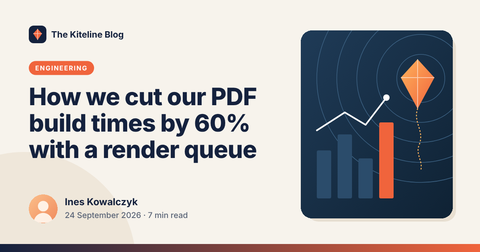
A 1200 × 630 link-preview image for blog posts: site name, a category pill that grows with its text, a post title that shrinks to fit, the author's photo, name, date and reading time, and a cover image panel. Render one for every post you publish.
PNG1200 × 630 pxLocale en-GBCanvas
Opens Dynamic Document API with this template preloaded in a free workspace, in the canvas editor.
Features
- Text that fits its box
How image templates are built is described in the canvas editor guide.
Dynamic properties
7 properties a render can set, sent flat in data. A property you leave out keeps its designed value.
| Key | Type | Example |
|---|---|---|
| site.textSite or blog name · up to 40 characters | string | "The Kiteline Blog" |
| category.textCategory · up to 28 characters | string | "ENGINEERING" |
| title.textPost title · up to 120 characters, longer text is shortened | string | "How we cut our PDF build times by 60% with a r…" |
| author.textAuthor name · up to 60 characters | string | "Ines Kowalczyk" |
| meta.textDate and reading time · up to 60 characters | string | "24 September 2026 · 7 min read" |
| cover.srcCover image · Article cover: https:// or data: URL | string | designed value |
| avatar.srcAuthor photo · https:// or data: URL | string | designed value |
Render it with the API
After adding the template to your workspace, render it by ID and pass your data.
curl -X POST https://api-eu.dynamicdocumentapi.com/v1/renders \
  -H "Authorization: Bearer $DYNAMIC_DOCUMENT_API_KEY" \
  -H "Idempotency-Key: $(uuidgen)" \
  -H "Content-Type: application/json" \
  -d '{
  "input": {
    "type": "template",
    "template_id": "tpl_01J9ZK3M7Q8V5W2X4Y6Z8A0B1C"
  },
  "data": {
    "site.text": "The Kiteline Blog",
    "category.text": "ENGINEERING",
    "title.text": "How we cut our PDF build times by 60% with a render queue",
    "author.text": "Ines Kowalczyk",
    "meta.text": "24 September 2026 · 7 min read"
  },
  "output": {
    "format": "png",
    "filename": "blog-post-og-image.png"
  }
}'
const response = await fetch("https://api-eu.dynamicdocumentapi.com/v1/renders", {
method: "POST",
headers: {
Authorization: `Bearer ${process.env.DYNAMIC_DOCUMENT_API_KEY}`,
"Content-Type": "application/json",
"Idempotency-Key": crypto.randomUUID(),
},
body: JSON.stringify({
"input": {
"type": "template",
"template_id": "tpl_01J9ZK3M7Q8V5W2X4Y6Z8A0B1C"
},
"data": {
"site.text": "The Kiteline Blog",
"category.text": "ENGINEERING",
"title.text": "How we cut our PDF build times by 60% with a render queue",
"author.text": "Ines Kowalczyk",
"meta.text": "24 September 2026 · 7 min read"
},
"output": {
"format": "png",
"filename": "blog-post-og-image.png"
}
}),
});
if (!response.ok) throw new Error(`Request failed: ${response.status}`);
const result = await response.json();
console.log(result);import os
import uuid
import requests
response = requests.post(
"https://api-eu.dynamicdocumentapi.com/v1/renders",
headers={
"Authorization": f"Bearer {os.environ['DYNAMIC_DOCUMENT_API_KEY']}",
"Idempotency-Key": str(uuid.uuid4()),
},
json={
"input": {
"type": "template",
"template_id": "tpl_01J9ZK3M7Q8V5W2X4Y6Z8A0B1C",
},
"data": {
"site.text": "The Kiteline Blog",
"category.text": "ENGINEERING",
"title.text": "How we cut our PDF build times by 60% with a render queue",
"author.text": "Ines Kowalczyk",
"meta.text": "24 September 2026 · 7 min read",
},
"output": {
"format": "png",
"filename": "blog-post-og-image.png",
},
},
timeout=90,
)
response.raise_for_status()
print(response.json())